



Thinking about Pobo? Let us show it to you.
Book a short 30-minute call where we'll show you how Pobo works, what it's good for, and how it can save you a lot of time and money.
Book a call
We believe that every e-shop deserves a premium look. Our AI will help you create it effortlessly.
Vojta Vaněk, AI engineer
Connect Pobo to your favorite e-shop platform and start creating right away.
Tomáš Smetka, Co-Founder
We don't just build a tool, we build relationships. Write to us and see for yourself.
Michal Štikar, Co-FounderYou now have the ability to easily switch between multiple e-shops and add multiple users to a single e-shop to manage it. If you manage multiple e-shops or want to make editing your e-shop available to other people.

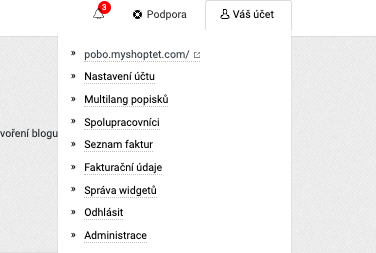
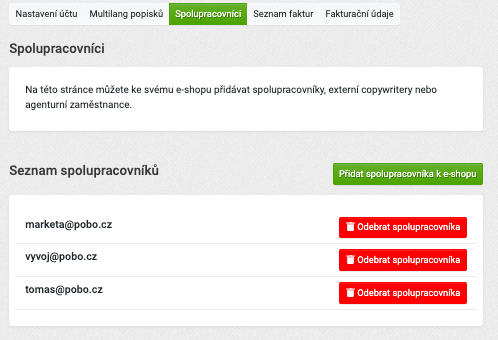
One e-shop can now be managed by multiple people. So you can add your co-workers, employees or freelance copywriters to your account. Similarly, you can manage multiple e-shops from your account. How to do it?
If you invite a co-worker who also has an e-shop, you will be able to switch between the two e-shops.
Collaborators will get access to all the features of Pobo Page Builder.
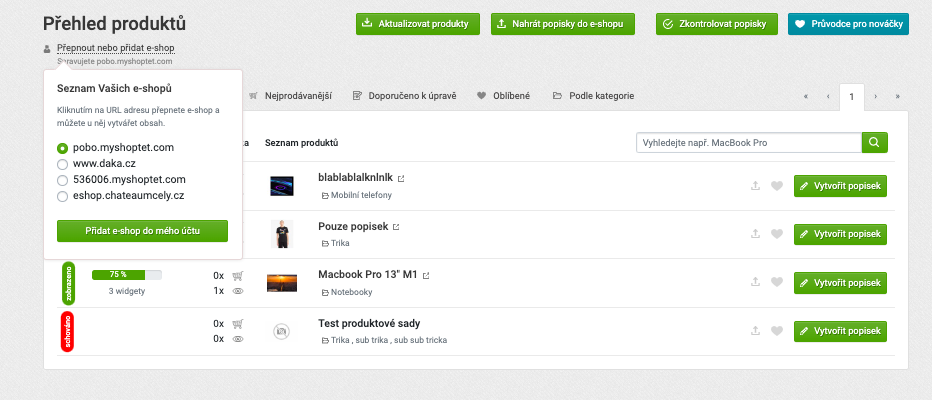
On the product page there is an option to "Switch or add e-shop". In this menu you can find all the e-shops you have access to and switch between them with one click. If you want to add a new e-shop to your account, you need to enter the e-mail address to which the e-shop is registered in the "Collaborators" section (see point 1 - Adding users and e-shops).

Book a short 30-minute call where we'll show you how Pobo works, what it's good for, and how it can save you a lot of time and money.
Book a call